Currently I am pursuing PHD, My Interests are Gardening, Learning new things ...
Information storage management and disaster recovery
Updated on
Edit
Like
Comment
Share
Sign in
INFORMATION STORAGE MANAGEMENT AND DISASTER RECOVERY
Information Storage Technology
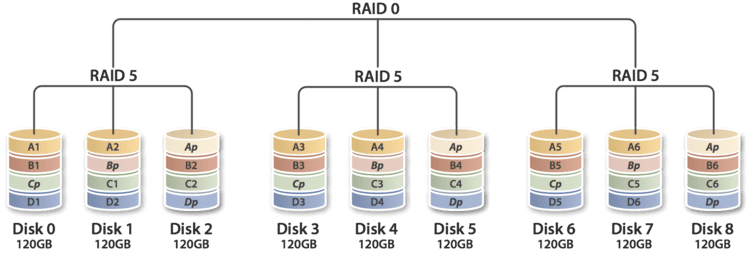
Data Protection RAID RAID (originally redundant array of inexpensive disks; now commonly redundant array of independent disks) is a data storage virtualization technology that combines multiple disk drive components into a logical unit for the purposes of data redundancy or performance improvement.
Data is distributed across the drives in one of several ways, referred to as RAID levels, depending on the specific level of redundancy and performance required. The different schemes or architectures are named by the word RAID followed by a number (e.g. RAID 0, RAID 1). Each scheme provides a different balance between the key goals: reliability and availability, performance and capacity. RAID levels greater than RAID 0 provide protection against unrecoverable (sector) read errors, as well as whole disk failure.
A number of standard schemes have evolved. These are called levels. Originally, there were five RAID levels, but many variations have evolved—notably several nested levels and many non-standard levels (mostly proprietary). RAID levels and their associated data formats are standardized by the Storage Networking Industry Association (SNIA) in the Common RAID Disk Drive Format (DDF) standard:
RAID 0 RAID 0 comprises striping (but neither parity nor mirroring). This level provides no data redundancy nor fault tolerance, but improves performance through parallelism of read and write operations across multiple drives. RAID 0 has no error detection mechanism, so the failure of one disk causes the loss of all data on the array.
RAID 1 RAID 1 comprises mirroring (without parity or striping). Data is written identically to two (or more) drives, thereby producing a "mirrored set". The read request is serviced by any of the drives containing the requested data. This can improve performance if data is read from the disk with the least seek latency and rotational latency. Conversely, write performance can be degraded because all drives must be updated; thus the write performance is determined by the slowest drive. The array continues to operate as long as at least one drive is functioning. RAID 2 RAID 2 comprises bit-level striping with dedicated Hamming-code parity. All disk spindle rotation is synchronized and data is striped such that each sequential bit is on a different drive. Hamming-code parity is calculated across corresponding bits and stored on at least one parity drive. This level is of historical significance only. Although it was used on some early machines (e.g. the Thinking Machines CM-2), it is only recently used by high-performance commercially available systems.
RAID 3 RAID 3 comprises byte-level striping with dedicated parity. All disk spindle rotation is synchronized and data is striped such that each sequential byte is on a different drive. Parity is calculated across corresponding bytes and stored on a dedicated parity drive. Although implementations exist, RAID 3 is not commonly used in practice.
RAID 4 RAID 4 comprises block-level striping with dedicated parity. This level was previously used by NetApp, but has now been largely replaced by a proprietary implementation of RAID 4 with two parity disks, called RAID-DP.
RAID 5 RAID 5 comprises block-level striping with distributed parity. Unlike in RAID 4, parity information is distributed among the drives. It requires that all drives but one be present to operate. Upon failure of a single drive, subsequent reads can be calculated from the distributed parity such that no data is lost. RAID 5 requires at least three disks. RAID 5 is seriously affected by the general trends regarding array rebuild time and chance of failure during rebuild. In August 2012, Dell posted an advisory against the use of RAID 5 in any configuration and of RAID 50 with "Class 2 7200 RPM drives of 1 TB and higher capacity".
RAID 6 RAID 6 comprises block-level striping with double distributed parity. Double parity provides fault tolerance up to two failed drives. This makes larger RAID groups more practical, especially for high-availability systems, as large-capacity drives take longer to restore. As with RAID 5, a single drive failure results in reduced performance of the entire array until the failed drive has been replaced. With a RAID 6 array, using drives from multiple sources and manufacturers, it is possible to mitigate most of the problems associated with RAID 5. The larger the drive capacities and the larger the array size, the more important it becomes to choose RAID 6 instead of RAID 5. RAID 10 also minimizes these problems.
evolution of network storage The storage I/O path has been evolving quite rapidly in the last few years. New layers are appearing in the form of inline network devices, hypervisors, and object-based storage models. Meanwhile, traditional layers like logical volume managers and RAID arrays are being collapsed into all-in-one file systems. This lecture sets the stage for the remaining 3 talks at LISA Data Storage Day. It provides the foundation for understanding the various ways to integrate solid state storage, data tiering and life-cycle management, and data protection into existing storage environments.
Topics include: The storage I/O path Storage virtualization The evolution of SAN and NAS solutions Virtual I/O LAN-based storage virtualization and virtual file systems Logical volume management Principles of object-based storage
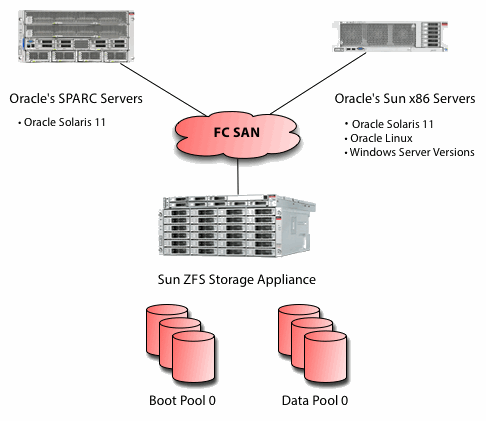
overview of FC San Fibre Channel, or FC, is a high-speed network technology (commonly running at 2-, 4-, 8- and 16-gigabit per second rates) primarily used to connect computer data storage. Fibre Channel is standardized in the T11 Technical Committee of the International Committee for Information Technology Standards (INCITS), an American National Standards Institute (ANSI)-accredited standards committee. Fibre Channel was primarily used in supercomputers, but has become a common connection type for storage area networks (SAN) in enterprise storage. Despite its name, Fibre Channel signaling can run on an electrical interface in addition to fiber-optic cables. Fibre Channel Protocol (FCP) is a transport protocol (similar to TCP used in IP networks) that predominantly transports SCSI commands over Fibre Channel networks.
NAS Network-attached storage (NAS) is now a major player in the externally connected storage market, moving from simple filer to storage networking protocol provider. More customers are using NAS as part of their core data storage infrastructure to deliver file services and support business critical applications. As a VAR or systems integrator, you should be taking advantage of NAS features like snapshots and replication to meet customers growing business storage needs.
Before you jump on board the NAS bandwagon, use this project guide to help you determine whether NAS is the right product for your customers. For instance, in the NAS strategy chapter, youll find comparisons of NAS with direct-attached storage (DAS) and storage area network (SAN) protocols, so you can determine which may be a customers optimal solution.
NAS now has rather complex backup features, including advanced snapshot technologies, disk-based backup functionality and integration with leading backup software tools. Furthermore, managing NAS represents a new challenge as it is an ever-developing technology. You must consider how to handle scalable growth, provide enterprise-level availability, and ensure data security and compliance.
IP San Internet Protocol, or IP, has grown to become the most widely used telecommunications standard worldwide. The technology is well understood, easy to implement and affordable. Most corporate data traffic uses a common IP network, except for storage data. IP storage has grown to be viewed as an extremely cost effective, easier to manage, and less complex storage solution than either DAS (Direct-Attached Storage) or FC-SAN. (Fibre Channel Storage Area Network) internet SCSI (iSCSI) can transport traditional high performance ""Block-based"" storage data over a common IP network.
IP SAN has the advantage of not requiring special hardware to deploy it because for the most part its implementation is based entirely on existing technology with a layer of software implementation on both the client and server side. With the appropriate IP SAN software, a regular server can be turned into an IP SAN server without needing to purchase any additional hardware.
file sharing File sharing is the practice of distributing or providing access to digitally stored information, such as computer programs, multimedia (audio, images and video), documents or electronic books. It may be implemented through a variety of ways. Common methods of storage, transmission and dispersion include manual sharing utilizing removable media, centralized servers on computer networks, World Wide Web-based hyperlinked documents, and the use of distributed peer-to-peer networking.
Types of file sharing
1. Peer-to-peer file sharing Users can use software that connects in to a peer-to-peer network to search for shared files on the computers of other users connected to the network. Files of interest can then be downloaded directly from other users on the network. Typically, large files are broken down into smaller chunks, which may be obtained from multiple peers and then reassembled by the downloader. This is done while the peer is simultaneously uploading the chunks it already has to other peers.
2. File sync and sharing services Cloud-based file syncing and sharing services allow users to create special folders on each of their computers or mobile devices, which the service then synchronizes so that it appears to be the same folder regardless of which computer is used to view it. Files placed in this folder also are typically accessible through a website and mobile app, and can be easily shared with other users for viewing or collaboration. Such services have become popular via consumer products such as Dropbox and Google Drive. rsync is a more traditional program released in 1996 which synchronizes files on a direct machine-to-machine basis. Data synchronization in general can use other approaches to share files, such as distributed filesystems, version control, or mirrors.
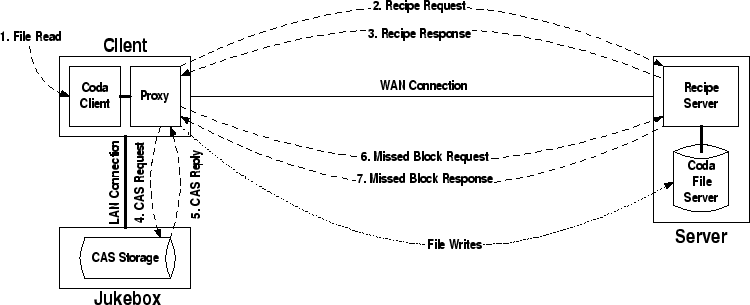
Content-addressable storage Content-addressable storage, also referred to as associative storage or abbreviated CAS, is a mechanism for storing information that can be retrieved based on its content, not its storage location. It is typically used for high-speed storage and retrieval of fixed content, such as documents stored for compliance with government regulations. Roughly speaking, content-addressable storage is the permanent-storage analogue to content-addressable memory.
Content Addressable Storage (CAS) and Fixed Content Storage (FCS) are different acronyms for the same type of technology. The CAS / FCS technology is intended to store data that does not change (fixed) in time. The difference is that typically CAS exposes a digest generated by a cryptographic hash function (such as MD5 or SHA-1) from the document it refers to. If the hash function is weak, this method could be subject to collisions in an adversarial environment (different documents returning the same hash). The main advantages of CAS / FCS technology is that the location of the actual data and the number of copies is unknown to the user. The metaphor of a CAS / FCS is not that of memory and memory locations. The proper metaphor is that of a coat check.[citation needed] The difference is that, with a coat check, once the item has been retrieved it cannot be retrieved again. With CAS / FCS technology a client is able to retrieve the same data using the same claim check over and over. Storage virtualization Storage virtualization is a concept and term used within computer science. Specifically, storage systems may use virtualization concepts as a tool to enable better functionality and more advanced features within and across storage systems. Broadly speaking, a storage system is also known as a storage array or Disk array or a filer. Storage systems typically use special hardware and software along with disk drives in order to provide very fast and reliable storage for computing and data processing. Storage systems are complex, and may be thought of as a special purpose computer designed to provide storage capacity along with advanced data protection features. Disk drives are only one element within a storage system, along with hardware and special purpose embedded software within the system.
Storage systems can provide either block accessed storage, or file accessed storage. Block access is typically delivered over Fibre Channel, iSCSI, SAS, FICON or other protocols. File access is often provided using NFS or CIFS protocols. Within the context of a storage system, there are two primary types of virtualization that can occur:
1. Block virtualization used in this context refers to the abstraction (separation) of logical storage (partition) from physical storage so that it may be accessed without regard to physical storage or heterogeneous structure. This separation allows the administrators of the storage system greater flexibility in how they manage storage for end users.
2. File virtualization addresses the NAS challenges by eliminating the dependencies between the data accessed at the file level and the location where the files are physically stored. This provides opportunities to optimize storage use and server consolidation and to perform non-disruptive file migrations.
Business continuity Business continuity encompasses a loosely defined set of planning, preparatory and related activities which are intended to ensure that an organizations critical business functions will either continue to operate despite serious incidents or disasters that might otherwise have interrupted them, or will be recovered to an operational state within a reasonably short period. As such, business continuity includes three key elements: 1. Resilience: critical business functions and the supporting infrastructure are designed and engineered in such a way that they are materially unaffected by most disruptions, for example through the use of redundancy and spare capacity; 2. Recovery: arrangements are made to recover or restore critical and less critical business functions that fail for some reason. 3. Contingency: the organization establishes a generalized capability and readiness to cope effectively with whatever major incidents and disasters occur, including those that were not, and perhaps could not have been, foreseen. Contingency preparations constitute a last-resort response if resilience and recovery arrangements should prove inadequate in practice.
If there is no Business Continuity plan implemented and the organization in question is facing a rather severe threat or disruption that may lead to bankruptcy, the implementation and outcome, if not too late, may strengthen the organizations survival and its continuity of business activities (Gittleman, 2013).
The management of business continuity falls largely within the sphere of risk management, with some cross-over into related fields such as governance, information security and compliance. Risk is a core consideration since business continuity is primarily concerned with those business functions, operations, supplies, systems, relationships etc. that are critically important to achieve the organizations operational objectives. Business Impact Analysis is the generally accepted risk management term for the process of determining the relative importance or criticality of those elements, and in turn drives the priorities, planning, preparations and other business continuity management activities.
The foundation of business continuity are the standards, program development, and supporting policies; guidelines, and procedures needed to ensure a firm to continue without stoppage, irrespective of the adverse circumstances or events. All system design, implementation, support, and maintenance must be based on this foundation in order to have any hope of achieving business continuity, disaster recovery, or in some cases, system support.
Disaster recovery Disaster recovery (DR) the policies, process and procedures that are related to preparing for recovery or continuation of technology infrastructure which are vital to an organization after a natural or human-induced disaster. Disaster recovery focuses on the IT or technology systems that support business functions, as opposed to business continuity, which involves planning to keep all aspects of a business functioning in the midst of disruptive events. Disaster recovery is a subset of business continuity.
Disaster recovery is developed in the mid- to late 1970s as computer center managers began to recognize the dependence of their organizations on their computer systems. At that time most systems were batch-oriented mainframes which in many cases could be down for a number of days before significant damage would be done.
Replication tchnologies
Replication in computing involves sharing information so as to ensure consistency between redundant resources, such as software or hardware components, to improve reliability, fault-tolerance, or accessibility. data replication if the same data is stored on multiple storage devices, computation replication if the same computing task is executed many times.
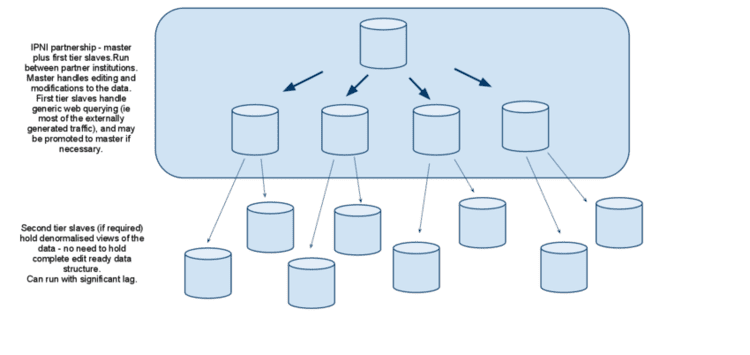
Primary-backup and multi-primary replication Many classical approaches to replication are based on a primary/backup model where one device or process has unilateral control over one or more other processes or devices. For example, the primary might perform some computation, streaming a log of updates to a backup (standby) process, which can then take over if the primary fails. This approach is the most common one for replicating databases, despite the risk that if a portion of the log is lost during a failure, the backup might not be in a state identical to the one the primary was in, and transactions could then be lost.
A weakness of primary/backup schemes is that in settings where both processes could have been active, only one is actually performing operations. Were gaining fault-tolerance but spending twice as much money to get this property. For this reason, starting in the period around 1985, the distributed systems research community began to explore alternative methods of replicating data. An outgrowth of this work was the emergence of schemes in which a group of replicas could cooperate, with each process backup up the others, and each handling some share of the workload.
Remote replication Remote replication is an essential part of data protection, providing protection in case of primary site failure. Remote replication provides a continuous, non-disruptive, host-independent solution for disaster recovery, data backup or migration over a long distance. Users concerned about budget, performance impact and data availability can flexibly choose to deploy synchronous or asynchronous replication.
Remote replication leverages the power of storage systems to copy data between storage pools or systems in IP or FC SAN at different sites. When source data fails due to system malfunction or accidents, users can leverage the disk-based remote copy to restart service in minutes. If users would like to transfer responsibility back to the source, it can be quickly synced with the remote copy for only differentials. To further ensure the integrity of the remote data, remote replication allows users to protect the remote copy with snapshot technology. Granular snapshot images can help restore the corrupt remote copy in seconds when it is required to resume business service.
Security Frameworks There are a variety of ways to ensure the security of data and the integrity of data transfer, depending on the set of anticipated attacks, the level of security desired by data owners, and the level of inconvenience users are willing to tolerate. Current storage systems secure data either by encrypting data on the wire, or by encrypting data on the disk. These systems seem very different, and currently there are no common parameters for comparing them. In this paper we propose a framework in which both types of systems can be evaluated along the security and performance axes. In particular, we show that all of the existing systems merely make different trade-offs along a single continuum and among a set of related security primitives.
We use a trace from a time-sharing UNIX server used by a medium-sized workgroup to quantify the costs associated with each of these secure storage systems. We show that encrypt-on-disk systems offer both increased security and improved performance over encrypt-on-wire in the traced environment.